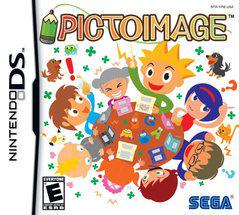
PictoImage - Nintendo DS
Couldn't load pickup availability
PictoImage - Nintendo DS turns your handheld into a pocket-sized art studio, letting you sketch, doodle, and design wherever inspiration strikes. Built for the Nintendo DS dual-screen and its precise touch controls, PictoImage delivers a tactile, on-the-go drawing experience that feels natural from the first stroke.
PictoImage isn’t just a basic doodle pad. It’s a dedicated handheld illustration tool crafted to make your ideas flow quickly and cleanly, whether you’re commuting, waiting between classes, or relaxing at a café. The interface is streamlined for the DS—clear tools, fast rendering, and an instinctive layout that keeps your art front and center.
Key features that differentiate PictoImage
- Dual-screen workflow: keep your canvas on one screen while your palette, layers, and reference material sit on the other for seamless, uninterrupted drawing.
- Touch-responsive brushes: a versatile brush engine with pencil, ink, marker, airbrush, and texture options that respond to speed and pressure for natural, expressive strokes.
- Pixel-art and vector-friendly tools: zoom, grid, and snap-to-pixel modes make it easy to craft crisp retro sprites or detailed line art.
- Layered editing: non-destructive layers let you build up color, shading, and highlights without altering your base sketch.
- Smart color controls: multiple palettes, swatches, and an intuitive color picker help you lock in the right mood fast.
- Templates and guided prompts: starter templates to spark ideas and help beginners find their footing with confidence.
- Optimized for portability: lightweight on memory, snappy on the DS hardware, so your ideas stay responsive without slowdowns.
Who should use PictoImage?
PictoImage is ideal for students, hobbyists, indie game creators, and anyone who wants a real drawing workflow in a compact, portable package. If you sketch on the go, PictoImage makes it easy to capture character concepts, doodles, or pixel art without hauling additional gear.
Use cases and practical outcomes
- Draft character concepts during a commute and refine them later on a larger screen.
- Design retro pixel sprites with precision grid snapping for game prototypes or fan art.
- Experiment with color schemes quickly using palettes to nail the right atmosphere for scenes.
- Organize artwork across multiple layers—line art, shading, and color—so edits stay non-destructive and reversible.
Tips to maximize PictoImage
Start with a light sketch on one layer, lock the base line art, and build depth on additional layers. Use the reference panel on the second screen to keep ideas aligned while you work on the main canvas. When you’re finished, save your artwork on the DS and transfer it later for sharing with friends or moving into other projects.
Pre-owned items may show signs of wear, such as minor scratches, blemishes, or sticker residue, but we ensure every game is in good working condition through thorough inspection and polishing if needed. Loose items are games or accessories that include only cartridges, disks, or non-sealed accessories. Negative quality items may have torn, burst, scratched, worn, or other issues. Please contact us if you need more information, returns, or refunds. Here is the link for returns or refunds: Returns & Refunds
Share